torque-pro-assistant - v1.0.0
Torque Pro Assistant


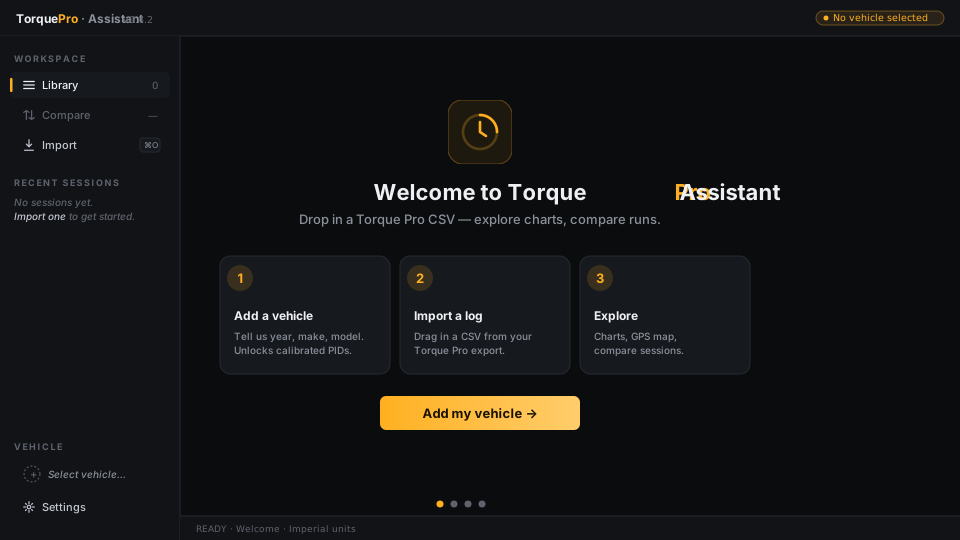
Desktop log viewer for Torque Pro OBD-II driving sessions. Drop in a CSV export, explore the data with charts, and compare historic trips side-by-side.
🛠️ Setup
These setup steps are for developers working on the app. End users who install a packaged build (MSI / DMG / DEB) need none of this — the installer ships everything.
Prerequisites
| Tool | Recommended | Notes |
|---|---|---|
| Node.js | 20.x LTS | Required ≥ 18.18 (or ≥ 20.9 LTS). ESLint 9 enforces this. |
| Yarn 1 | 1.22.x | npm install works too, but the lockfile + scripts are tested against Yarn 1. |
| Python | 3.10 – 3.12 | Used for the Flask service in dev and bundled by PyInstaller for production. |
| pip | bundled with Python | Use pip, pip3, or py -m pip — whichever your install exposes. |
Platform-specific (only when packaging installers):
- Windows MSI: WiX Toolset 3.x on
PATH(e.g.,C:\Program Files (x86)\WiX Toolset v3.14.1\bin). - Linux DEB:
fakerootanddpkgonPATH(sudo apt install fakeroot dpkg). - macOS DMG: no extra tools needed for an unsigned build. Code signing requires an Apple Developer ID.
Install dependencies
Clone the repo and from the project root:
Python deps (Flask, flask-cors, PyInstaller, pytest):
pip install -r requirements.txt
Node deps:
yarn install
⚙️ Config
Electron: main.ts and preload.ts live at the project root. They compile to dist-electron/ via tsc -p tsconfig.electron.json (run automatically by yarn start and yarn build).
React: Renderer code lives in ./src/. The renderer root is ./src/components/app/, which hosts the Mantine AppShell and the platform-aware window chrome — frameless on Windows / Linux with custom min/max/close controls inside the header, titleBarStyle: 'hiddenInset' on macOS so the OS renders the real traffic lights.
UI: Mantine (core, hooks, dates, notifications, dropzone). Theme is configured in the renderer entry point and defaults to dark mode.
Charts & CSV: Recharts for plotting and Papa Parse for parsing the Torque Pro CSV exports — both installed but not yet wired into features.
Python: Backend lives in ./app.py. The renderer reaches it over http://127.0.0.1:<port> — main.ts picks a free port in 3001–3999 and hands it to the renderer via the contextBridge electronAPI.getPort(). A /ping route is wired as proof of life; real Torque-Pro-specific routes will be added as features land.
📜 Scripts
The full list is in package.json under scripts. The everyday ones:
⚠️ PyInstaller is included in requirements.txt, so a separate install is no longer required. Installer metadata (name, version, manufacturer, description) is pulled from the matching fields in package.json automatically. |
|---|
Start developer mode (React dev server + Electron + Flask, with hot reload):
yarn run start
Package Windows: 1
yarn run build:package:windows
Package macOS:
yarn run build:package:mac
Package Linux:
yarn run build:package:linux
Build documentation:
yarn run build:docs
1Windows uses electron-wix-msi; install WiX Toolset and add it to your environment variables.
✅ Verify
Run before pushing — same chain CI runs.
Full chain (lint → typecheck → jest → pytest → React build):
yarn verify
Individual steps:
yarn lint # ESLint 9 flat config (eslint.config.ts)
yarn typecheck # tsc --noEmit across renderer / electron / scripts tsconfigs
yarn test # CRA jest runner
yarn test:python # pytest against tests/test_app.py
🐱👓 Docs
Code documentation, generated with TypeDoc, is built into ./docs/ via yarn run build:docs.
🦟 Bugs
Bugs reported on the project's issues page will be exterminated as quickly as possible, be sure to include steps to reproduce so they can be spotted easily.
🏷️ License
MIT © iPzard